@ColdWater that and probably the Microsoft root certificate stored in your motherboard’s firmware
Also e.g. the lobbying around ACPI breaking suspend to ram sometimes. Funny little Bill Gates quote on that:
One thing I find myself wondering about is whether we shouldn’t try and make the “ACPI” extensions somehow Windows specific. It seems unfortunate if we do this work and get our partners to do the work and the result is that Linux works great without having to do the work. Maybe there is no way to avoid this problem but it does bother me. Maybe we could define the APIs so that they work well with NT and not the others even if they are open. Or maybe we could patent something related to this.
The antitrust war was in full effect when he said that. Gates is a good guy now, but he was a ruthless pos as head of MS.
You did see him praise trump at some kinda tech bro meeting in the white house the other day, right?
No, I didn’t. Wow…
His wife also left him because of Epstein connections…
deleted by creator
A bit of acetone will fix that.
The super key
the meta key
the “window manager goes brrrrr” key
For anyone interested, this is a tuxedo laptop

And soon, new laptops will have a second forced stupid Microsoft key. The copilot key.
Not even joking.
They’re on some “AI” laptop for a while now
I don’t know what I do to keyboards when I use them for a really long time, but I have the exact same laptop frame and keyboard and most modifier keys are unrecognizable and half of the WASD keys are rarely used keys because I fucked up the keycaps while cleaning and I got other keys off the keyboard in place of them. So anyways, my Windows key is abused beyond recognition and you can’t tell it was a Windows key.

Why are you going right so much more than left
I mean, if you think about it you tend to go right in 2d games, so I’m guessing he’s a fan
My bad, didn’t explain it well in my initial comment
I broke my A and S keys when cleaning: because the WASD keys on these keyboards are transparent, I could see all the hairs or dirt under them and once every 4 months let’s say, I was pulling them off
And one day they didn’t wanna reliably clip back in place anymore
So now I have Right Ctrl on A and Right FN on S to replace the keycaps
So, they’re basically newer keys in there, and also they are not transparent like A and S were
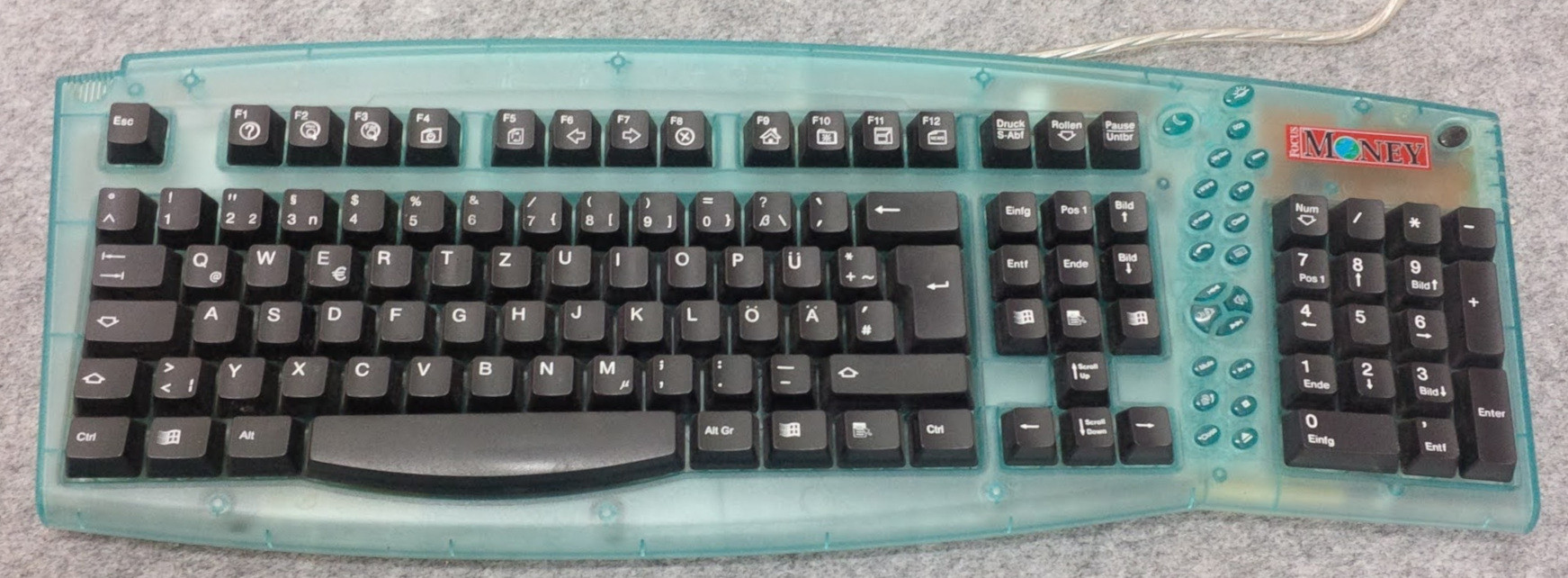
I used to have this really awesome early 2000’s transparent blue plastic keyboard with all the newest media keys. The only problem was that it had 4 windows keys on it! One on either side of the spacebar. The right side of the spacebar was Alt, Windows, Context menu, CTRL. That was a bit weird but it was alright. The next placements were crazy though. Someone figured there was space for more keys right below the Delete, End and Page Down keys but I guess they couldn’t really figure out what would be best for there so they put a 3rd Windows key, a 2nd Context Menu and then a 4th Windows key right there. This was pretty close to the arrow keys and if anyone remembers gaming in the early 2000’s, pressing the windows key accidentlly would often just crash your game completely. If you could get back into it, it could take quite a while for it to respond again. So if you were playing something like Warcraft 2 multiplayer, that button was a fucking nightmare.
Ugh, I loved the colour of that keyboard so much I put up with all those windows keys.
edit: I can’t believe I found it! I’ve tried searching for this keyboard a few times, but finally found proof on this site!
I submitted the mysterious extra
nsituation on military keyboards as a question for Lateral and they featured it in today’s episode!Spotify video • Spotify CDN raw file (34:18) • catbox.moe • Podverse.fm clip • Website with transcript
They reserve the right to edit questions and omitted the important
n-lock key. A keyboard with a permanently missing 3 would be ridiculous.Edit: Now it’s also a highlight on YouTube, their second-most-viewed last year, but they didn’t attribute the question to me there, not even in text
Do you know why the
3key has ann? I have a hunch:
This is clearly a tactical keyboard for use in military, aviation or maritime navigation systems! /s
Whoa, it’s beautiful. I’d be still using it with some usb adapter.
The “n” is probably a misprint, AltGr+2 prints “²” and AltGr+3 prints “³” in the German layout; it can be customized to actually print “n” or “ⁿ” in xkb though.
I mean, if the redundant Windows keys produce different codes, it could be worth a lot to macro enthusiasts. The model exists with an English QWERTY layout too:
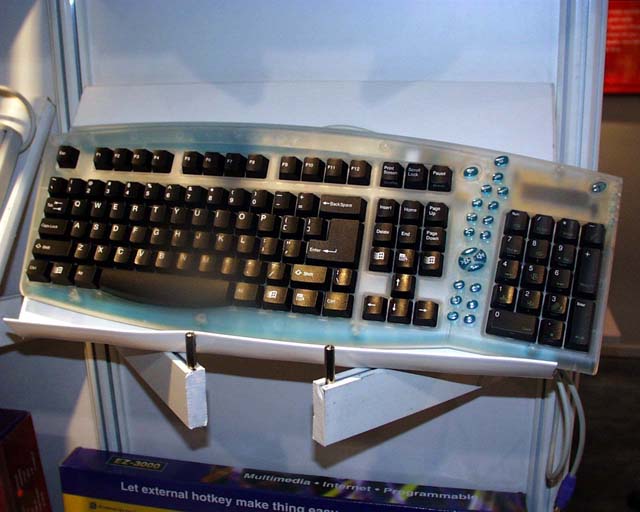
The picture seems to be from 1998 so you’ll likely need a passive DIN to mini-DIN adapter as well.
Edit: found out why there is “n” printed: the keyboard layout was designed for the OEM 850 code page that includes “ⁿ” but not “³”.
Now I gotta know the tactical reason for the 2 key to also have the 2 symbol?
I did’t know much about the German keyboard layout but I know the Czech one, which is derived from it (we both use QWERTZ) and was able to look up most of what I didn’t know.
So, the keyboard has 4 layers: default, Shift, AltGr, AltGr+Shift (the fourth one is not standard but is recognized by xkb; in Czech I use it for custom character mappings, in German it is standardized but Linux-only).
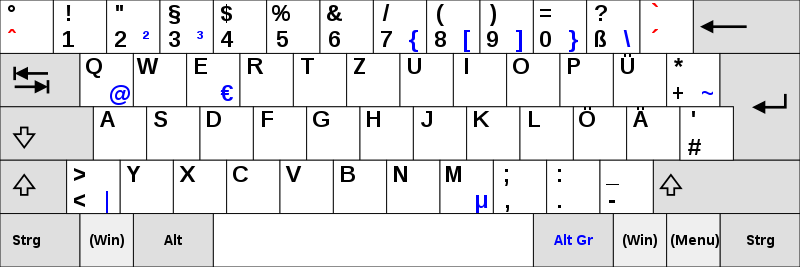
- Default layer prints lowercase letters a-z and äöüß, numbers and the symbols in the lower-left of each key.
- Shift layer prints uppercase letters A-Z and ÄÖÜ and symbols at the top left of each key.
- Caps Lock only affects letters. I don’t know what happens when you press ß with Caps Lock on a system too old to know about ẞ (only in Unicode since 2008, and “allowed” in German since 2017) and I don’t want to make vintage computers explode at 39c3.
- AltGr layer prints lower-right symbols, most of which are only populated in a later version of the layout.
- AltGr+Shift (Linux only) prints upper-right symbols.
As you can see, AltGr+2 produces ², and AltGr+3 produces ³. I think the full-size “2” and “n” are misprints. My old Czech keyboard has some errors too.
By the way, Czech is more chaotic:
- we have lots more diacritics so the number row only prints numbers on its Shift layer (most people therefore use the numpad only)
- to print rare diacritics (ó, ď, ť, ň, and German ä, ö, ü), one has to first press the corresponding modifier key (
´,ˇ,˚,¨) like on typewriters- an alternative for common capital diacritics (á, é, ě, í, ú, ů, ý, ž, š, č, ř) is to briefly turn on Caps Lock (advantage over typewriters)
- pressing the
˚key twice prints the degree sign (°) twice (Windows) or once (Linux)
- there is a bloody dedicated
§key but we need to press AltGr+7 twice, then backspace (or Alt+96) for a grave (`), which is part of ASCII and used in Markdown - physical keyboards almost always reserve the right side of the keys for the English-US layout (very confusing for novices) so one has to type in the AltGr layer blind (except for
€); it contains useful symbols ([]{}<>|\€$@#^&×÷`) as well as useless ones (Đđ – these are Slovene, why not the Slovak Ôô?), leading people to prefer Windows-only left-Alt+numpad codes (such as Alt+64 for @) that use the obsolete OEM-1252 codepage (the Unicode extension has to be enabled via registry and Alt+letters hex codes get passed to programs anyway, often defocusing the input element). I only found a Slovak one on Wikimedia Commons - some lazy manufacturers combine the Czech/English and Slovak/English layouts, which are similar except ľ, ť and ô, leading to 5 (!) symbols per key, 3 of which are irrelevant unless you switch layouts
- Gboard for Android offers QWERTY for Czech, which looks normal (hold for diacritics, potentially swipe for ě and ů) and the unpopular QWERTZ-PC, which has all the physical keyboard’s quirks, but its “Czech QWERTZ” is based off German QWERTZ, containing ú and ů but not the other diacritics for some reason. All other keyboard apps with Czech language layout get this right (hold for diacritics, potentially swipe for ě and ů)!
Why is there a Win-Lock option? I get Caps Lock and Fn-Lock but is there any other reason besides saving a finger for the all-important Win-Ctrl-Alt-Shift-L shortcut to open LinkedIn? /s
Its on gaming laptops so when you are playing, you dont accidentally open windows menu
Oh, so it does the reverse of what I thought
Super key? That’s not Window’s specfic, it’s just a logo.